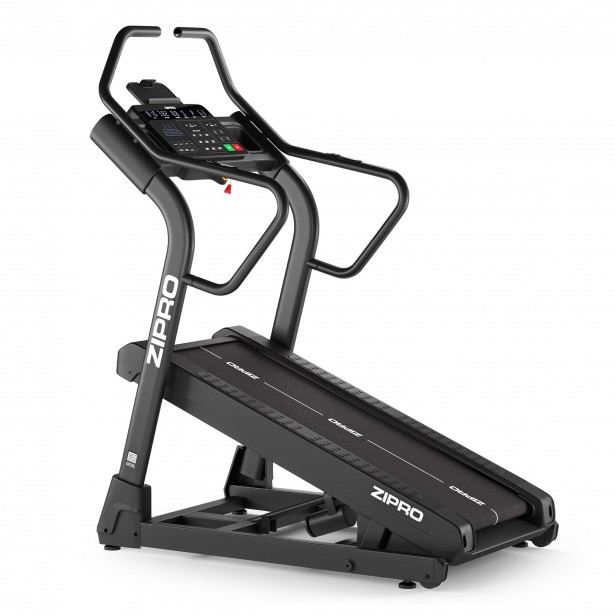
The ZIPRO Shred is a home treadmill built for steep uphill training, with a wide incline range and Bluetooth connectivity. With QZ, the Shred can become part of a more flexible connected-training setup, including automatic incline changes for structured workouts and compatible virtual-training workflows.

Table of Contents
Connect the ZIPRO Shred to QZ
The ZIPRO Shred is handled through QZ’s Bluetooth treadmill path. Its device name starts with SHRED, allowing QZ to identify the treadmill and apply the correct high-incline behavior.
- Turn on the ZIPRO Shred and close other fitness apps that may already be connected to it.
- Open QZ and allow Bluetooth access when requested.
- Start device discovery and select the treadmill whose Bluetooth name starts with SHRED.
- Wait for QZ to complete the FTMS treadmill connection and confirm that live treadmill data is visible.
- Test a low incline first, then try a higher value such as 22%, 25% or 40% before starting a long workout.
The exact Bluetooth suffix can vary by unit. Select the SHRED... entry belonging to your treadmill rather than relying on a fixed address.
ZIPRO Shred incline control up to 40%
The Shred is designed for steep training, and QZ supports the treadmill’s extended incline range. High values are preserved in structured XML workouts, including 5%, 15%, 22%, 25% and 40% examples.
- steep uphill walking and running;
- mountain and hiking preparation;
- interval sessions with changing grades;
- structured workouts above the standard 15% treadmill range;
- virtual routes and training applications that request automatic incline changes.
The key benefit is that QZ can pass the Shred’s higher incline requests through without collapsing them into a 15% ceiling. The treadmill’s own safety limits and operating behavior remain authoritative.
XML workouts and training programs
QZ can load structured workout files and preserve the Shred’s high-incline values. A workout can therefore move from moderate grades to steep climbing sections while retaining the intended progression.
When a training program should keep its own speed behavior while QZ manages the incline, use QZ’s existing Train Program PID Ignore Inclination setting. This separates the incline target from the program’s speed-control logic and helps avoid unwanted speed corrections during climbing workouts.
The ZIPRO Shred compatibility path is focused on incline handling. Speed telemetry and other FTMS features depend on the treadmill connection and the selected QZ workflow.
What QZ adds to the Shred
With QZ acting as the connection layer, the ZIPRO Shred can be used with a broader connected-training setup. Depending on the selected application, profile and virtual-device settings, QZ can provide:
- live treadmill telemetry and customizable metric tiles;
- multiple profiles and UI zoom customization;
- heart-rate support from Apple Watch, ANT+ devices and Bluetooth sensors;
- custom heart-rate zones and wattage estimation from heart rate and cadence where applicable;
- Zwift, Wahoo RGT, Wahoo DirCon, VzFit, Rouvy, iFIT, Echelon and BitGym workflows where the selected platform supports them;
- Kinomap, MyWhoosh and other compatible apps when supported by the chosen QZ path;
- automatic incline, speed or resistance workflows only where the selected device path supports them;
- built-in or local/cloud video, GPX route following, 2D/3D maps, ZWO and XML workouts;
- heart-rate-following workouts, random workouts, standalone QZ workouts and structured/ERG sessions;
- end-of-workout email reports and Strava uploads;
- Garmin FIT/Garmin Connect, Apple Health/HealthKit and Google Health/Google Health Connect workflows where supported;
- MQTT, OpenSoundControl/OSC, text-to-speech/TTS, Bluetooth remote controls, Zwift Play & Click and ANT+ retransmission.
These are QZ ecosystem capabilities, not a claim that every item is native to the ZIPRO Shred. The device-specific feature in this article is the Bluetooth treadmill connection with high-incline control up to 40%; app accounts, subscriptions and platform support remain separate requirements.
A better connected climbing treadmill
The ZIPRO Shred already offers the hardware range needed for serious incline training. QZ adds a bridge to structured workouts, virtual training and a wider set of health, statistics and export workflows, while preserving the treadmill’s high-grade climbing targets.
Connect the Bluetooth device beginning with SHRED, verify live data, test a high incline and then start a structured workout. For riders who want more than the treadmill’s built-in console, QZ turns the Shred into a more adaptable connected-training platform.
If something does not work as expected, send an email to Roberto.viola83@gmail.com and Roberto will help you check the setup.
Learn more about QZ at qzfitness.com.
Sources
- ZIPRO Shred official product page — product identification and image attribution.
- QZ Fitness.
- QZ feature list — documented QZ capabilities and integrations.