
Table of Contents
HOUSEFIT SPIRO 80 iRun and QZ: Connected Treadmill Training with Speed and Incline
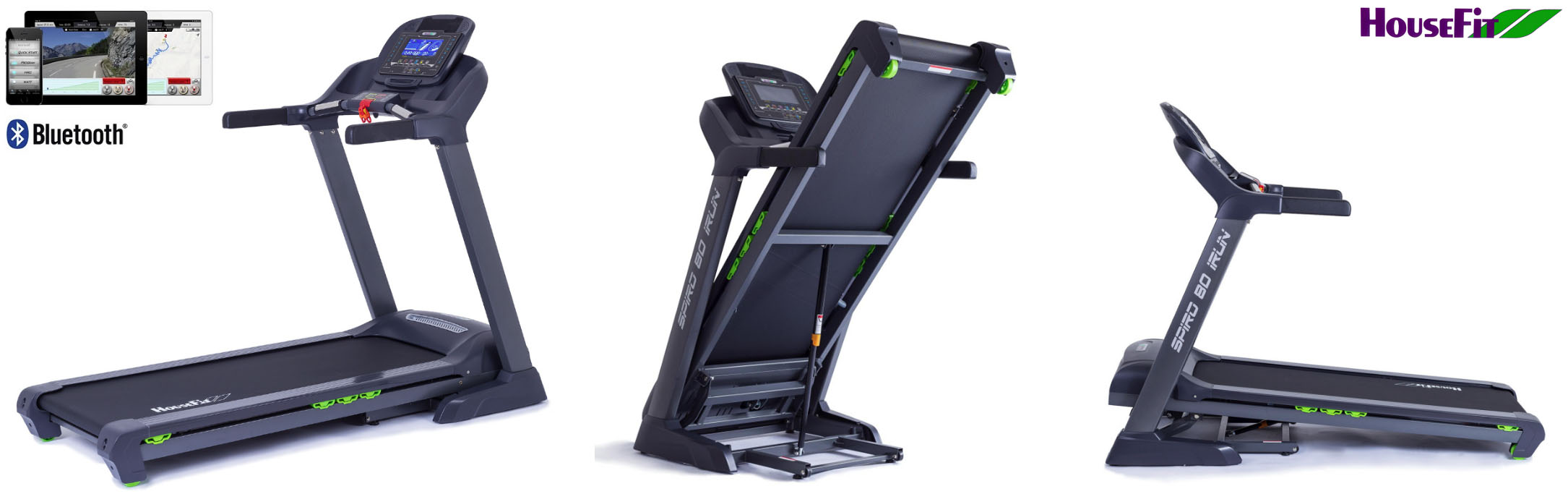
The HOUSEFIT SPIRO 80 iRun is a capable home treadmill with a cushioned 140 × 50 cm running surface, electronically controlled speed up to 18 km/h and motorized incline up to 18%. Its Bluetooth-equipped console and iConsole+ compatibility make it a natural candidate for a more flexible connected-training setup with QZ.
QZ can provide the software bridge between the treadmill and the training ecosystem you prefer. Instead of being limited to the console’s built-in programs, the SPIRO 80 iRun can be used with QZ for live treadmill data, connected apps, workout recording, structured sessions and supported speed or incline workflows.
Connect the HOUSEFIT SPIRO 80 iRun to QZ
The SPIRO 80 iRun may expose its Bluetooth service through a generic FTMS treadmill path or through an iConsole-compatible service, depending on the console and firmware. Use the service that appears on the treadmill you own:
- Wake the treadmill console and close iConsole+ or any other application currently connected to it.
- Open QZ and select Treadmill as the fitness device type.
- Open Treadmill Options and check FTMS Treadmill.
- If the treadmill appears in the Bluetooth device list, select its displayed Bluetooth name and restart QZ when requested.
- If the console exposes an iConsole-compatible service instead, enable the matching option under Toorx/iConsole Options and complete the discovery flow shown by QZ.
- Keep the treadmill awake, completely close and reopen QZ, then start walking or running.
- Confirm that speed, distance and incline data appear in QZ before starting a longer workout.
The Bluetooth name is supplied by the treadmill console and can vary by firmware; select the exact name shown by QZ rather than guessing a model label. The same approach also makes it easier to diagnose a console that is already occupied by iConsole+ or another training application.
What the SPIRO 80 iRun brings to connected training
The treadmill provides the core information needed for a connected running session, including:
- speed;
- distance;
- elapsed time;
- calories;
- incline;
- heart-rate data from the console or a compatible external sensor.
Its motorized incline range reaches 18%, while the speed range reaches 18 km/h. QZ can use the treadmill data as the connection layer for supported training applications and can expose the available treadmill controls according to the Bluetooth service and selected QZ profile.
Use the treadmill beyond the built-in programs
The SPIRO 80 iRun includes preset, heart-rate-controlled, user and manual training modes. QZ adds another layer around that hardware: live data can be displayed in a customizable interface, recorded for later analysis and shared with compatible applications or health services.
For route-based or structured training, QZ can connect the treadmill workflow to supported platforms such as Zwift, Rouvy, Wahoo RGT, iFIT, Kinomap and other compatible applications. The exact speed and incline automation depends on the selected profile and the capabilities exposed by the treadmill’s Bluetooth service.
The wider QZ ecosystem
Beyond this device-specific connection, QZ can act as a flexible training and data bridge across a much wider fitness ecosystem. The exact options depend on the selected profile, platform and hardware, but the broader QZ toolkit includes:
- customizable tiles, multiple profiles and UI zoom controls;
- Peloton metrics, power zones, resistance conversion and supported auto-resistance workflows;
- Apple Watch, ANT+ and Bluetooth heart-rate support, custom heart-rate zones and wattage estimation from heart rate and cadence where applicable;
- Zwift, Wahoo RGT, VzFit, Rouvy, iFIT, Echelon, BitGym and Wahoo DirCon workflows;
- built-in or local/cloud video, GPX route following, 2D/3D maps, ZWO and XML workouts, heart-rate-following workouts, random workouts, standalone QZ workouts and structured/ERG sessions;
- end-of-workout email reports, Strava uploads, Garmin FIT and Garmin Connect workflows, Apple Health/HealthKit and Google Health/Google Health Connect integrations where supported;
- MQTT, OpenSoundControl/OSC, text-to-speech/TTS, Bluetooth remote resistance shifting, Zwift Play & Click and ANT+ retransmission.
These are QZ ecosystem capabilities rather than a promise that every function is native to the HOUSEFIT treadmill. The exact device-specific Bluetooth path and the controls exposed by the current firmware remain authoritative; third-party apps may also have their own account, subscription and content requirements.
A flexible upgrade for the HOUSEFIT SPIRO 80 iRun
The SPIRO 80 iRun already combines a strong motor, a generous running surface, cushioning, motorized incline and a foldable home-treadmill design. QZ adds a practical bridge to modern connected training, helping you keep the existing hardware while gaining more flexibility over data, workouts, applications and exports.
Select Treadmill in QZ, use the Bluetooth service actually exposed by the console, restart QZ and verify the live metrics. Once the connection is visible, the HOUSEFIT SPIRO 80 iRun is ready to become part of a broader connected-training setup.
If something does not work as expected, send an email to Roberto.viola83@gmail.com and Roberto will help you check the setup.
Learn more about QZ at qzfitness.com.