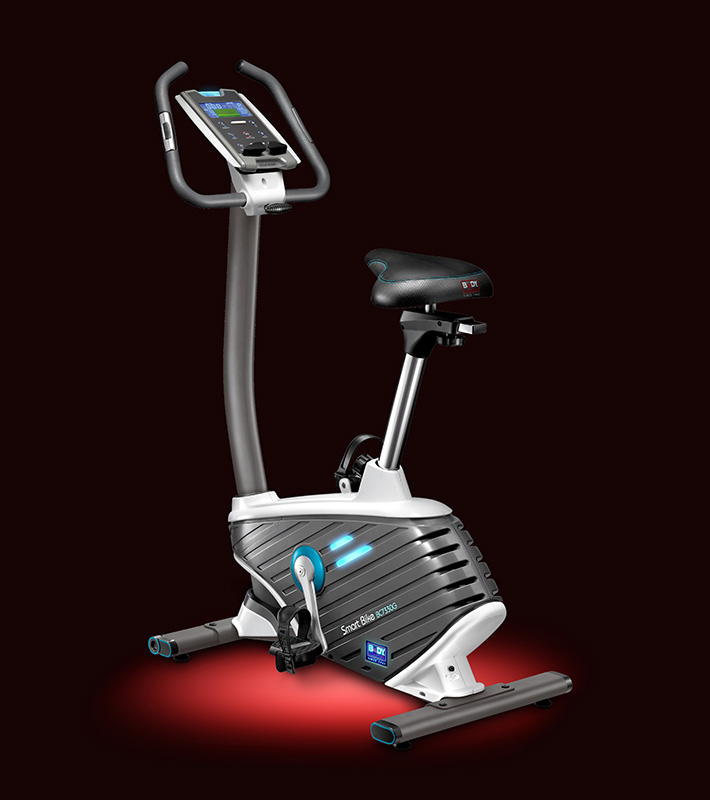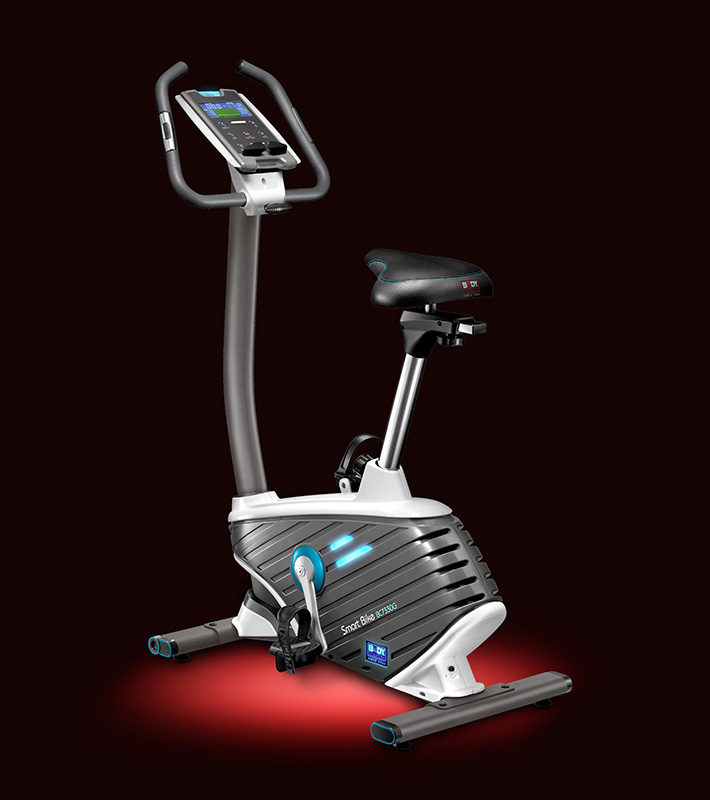
QZ now includes a dedicated compatibility path for the Body Sculpture BC-7330G iConsole+ bike. PR #5310 adds the model-specific discovery and proprietary iConsole+ command profile, allowing QZ to bring the bike into its connected-training ecosystem while keeping device-specific behavior separate from general QZ integrations.

Table of Contents
What the Body Sculpture BC-7330G is
Body Sculpture lists the BC-7330G as a programmable magnetic exercise bike with body-fat and hand-pulse measurement, an adjustable saddle and handlebar, transport wheels, a belt drive and a magnetic brake system. The official product page identifies the model as BC-7330G; QZ’s merged support work identifies its Bluetooth/iConsole+ path as the Body Sculpture bike profile.
What PR #5310 adds to QZ
| Capability | QZ implementation |
|---|---|
| Dedicated discovery | Bluetooth names beginning with BODYSCULPTURE are routed before the generic FTMS path, so the proprietary bike protocol is not incorrectly treated as a standard FTMS bike. |
| BC-7330G test profile | The QZ device test registry names the supported device Body Sculpture BC7330G and expects the shared trxappgateusbbike implementation. |
| iConsole+ initialization | QZ replays the capture-confirmed initialization sequence for the proprietary iConsole+ service and uses the Body Sculpture-specific channel selector 0x0D. |
| Live bike telemetry | The shared bike parser exposes speed, cadence, resistance, watts, calories and heart-rate values when valid packets contain those fields. QZ calculates session distance from the live workout stream. |
| Resistance command | QZ sends the Body Sculpture-specific resistance command through the 0x0D profile and bounds requested bike resistance to the shared bike-control range. The exact physical level response should be confirmed on the individual bike. |
| Polling and session updates | The profile keeps the bike console/telemetry path alive with the matching no-op polling frame while QZ updates metrics and applies queued resistance requests. |
Setup
- Install a QZ build containing PR #5310 or a later release containing merge commit
de4850e7. - Before testing, remove
BODYSCULPTURE203from QZ’s manually configured FTMS Bike setting if it is present; the PR specifically warns that a saved manual FTMS selection can interfere with the proprietary profile. - Turn on the bike’s Bluetooth connection and close the manufacturer or other training apps that might hold the bike connection.
- Start QZ and allow it to discover the
BODYSCULPTURE*device automatically. - Confirm that QZ receives speed, cadence, resistance and power-related values before pairing another app.
- If resistance control is needed, send a small target first and verify the physical console and QZ tile agree before starting a workout.
- Pair Zwift or another external app with QZ’s virtual bike/FTMS output rather than making the app compete for the physical Bluetooth connection.
The wider QZ feature set
QZ can be much more than a Bluetooth relay around a supported exercise bike. The exact result depends on the selected driver, operating system, permissions and target app. The following features are QZ capabilities around a compatible bike workflow; they are not claims that the Body Sculpture console natively provides every integration.
| Area | What QZ can offer |
|---|---|
| Profiles and interface | Multiple user/device profiles, custom tile order and visibility, UI zoom, live tiles, charts, workout history and session recording. |
| Bike metrics | Live speed, cadence/RPM, power, resistance, calories, distance calculated from the session and heart-rate data when the bike packet or a paired source supplies it. |
| Heart rate | Bluetooth heart-rate devices, ANT+ heart rate and Apple Watch sources, with configurable zones and heart-rate-guided workout workflows. |
| Virtual bike and FTMS | Virtual-bike/FTMS bridging for Zwift, MyWhoosh, Rouvy, Wahoo RGT, Kinomap, BKOOL, Fulgaz, VzFit, BitGym, Echelon and other compatible training applications. |
| Resistance and training control | Resistance targets, automatic-resistance or ERG-style workflows when the target app and the concrete QZ driver expose compatible commands. A virtual-bike connection alone does not guarantee every app can control the physical resistance. |
| Standalone QZ | Use QZ without another training app for live monitoring, recording, charts, target workouts, random sessions, heart-rate-following programs and virtual training workflows. |
| Workout formats | Video workouts, GPX routes with 2D/3D maps, ZWO Zwift workouts, XML files, structured intervals and random workouts where the selected path supports the required targets. |
| Health and exports | Apple Health/HealthKit, Google Health Connect, Garmin FIT and ANT+ workflows, Strava upload, email workout reports and compatible activity exports. |
| Advanced integrations | MQTT, OSC, text-to-speech, Wahoo DirCon, ANT+ retransmission, Bluetooth remote control and Zwift Play & Click integrations where the platform and setup support them. |
Zwift, MyWhoosh and other apps
With QZ acting as the bridge, the BC-7330G session can be presented to compatible virtual-bike or FTMS applications such as Zwift, MyWhoosh, Rouvy, Wahoo RGT, Kinomap, BKOOL, Fulgaz, VzFit, BitGym and other supported workflows. The app sees the virtual device exposed by QZ; the Body Sculpture bike remains connected to QZ. Whether an app can send a resistance target, and how that target is interpreted, depends on the app and the concrete QZ control path.
QZ can also run the session by itself: show live tiles and charts, record the workout, run structured or random intervals, follow a GPX route or video, use ZWO/XML workouts and follow heart-rate targets. The output can then be exported through the available health and training integrations.
What is confirmed and what still needs hardware testing
PR #5310 provides source-code, capture-based and automated discovery evidence for the Body Sculpture profile. It confirms the proprietary routing, initialization frames, polling path and resistance serializer in QZ. It does not by itself prove that every BC-7330G firmware revision accepts every resistance level or that every external app will control the bike correctly. Treat the first ride as a verification step and report the model name, QZ log and observed response if a command is not applied.
Troubleshooting
- Remove the saved
BODYSCULPTURE203manual FTMS selection before retrying automatic discovery. - Check that the Bluetooth name begins with
BODYSCULPTUREand that no other app is connected. - Restart QZ after changing the bike configuration or Bluetooth permissions.
- Verify live metrics in QZ before connecting Zwift or another target app.
- If the bike reports metrics but does not apply a target, check the selected virtual-bike pairing and confirm the app sends a compatible resistance command.
- Do not treat the generic QZ feature list as proof that the physical bike supports every advanced integration directly.
If something does not work as expected, send an email to Roberto.viola83@gmail.com with the QZ version, the displayed Bluetooth name and a sanitized log.