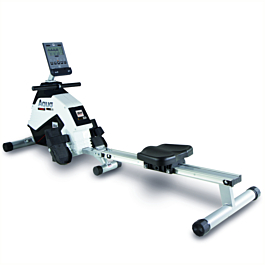
The BH Fitness AQUO Dual R309U works with QZ through the Pafers Rower path. In a confirmed support test, QZ connected to the rower identified as PAFERS_XxxxC, received live rowing data, and sent the workout through QZ’s Virtual Rower to MyWhoosh.

Table of Contents
What QZ receives from the AQUO Dual R309U
The BH Fitness AQUO Dual R309U is a compact magnetic rower with a Bluetooth-enabled console. BH Fitness documents rowing metrics such as time, watts, speed/RPM, calories and pulse on the product page. In the QZ test, the concrete Pafers rower path delivered live stroke rate, speed, distance and watts from the R309U into QZ.
Enable the correct QZ profile
Because the rower advertises itself as PAFERS_XxxxC, enable Pafers Rower in QZ’s Pafers Options. This is the setting that routes PAFERS devices to the Pafers rower handler; do not select the Pafers treadmill option for this machine. Restart QZ after changing the setting.
| QZ setting | Purpose |
|---|---|
| Pafers Rower | Routes the PAFERS_XxxxC device to QZ’s Pafers rower implementation. |
| Virtual Rower | Advertises the QZ rower profile to compatible third-party apps. |
| Virtual Rower as PM5 | Optional compatibility mode for apps that expect the Concept2 PM5 protocol. Enable it only when the target app needs PM5 emulation. |
MyWhoosh setup confirmed in the support test
- Enable Pafers Rower under QZ’s Pafers Options and restart QZ.
- Enable Virtual Rower in QZ’s experimental or virtual-device settings.
- Rename the phone running QZ to
ROW, using exactly three letters, then reboot the phone. This makes the QZ virtual rower easier for MyWhoosh to identify. - Start QZ and confirm that the AQUO Dual R309U is connected and live data is visible.
- On the second device running MyWhoosh, select the QZ virtual rower advertised with the
ROW-identity. - Start a Free Row session and confirm that the workout data travels from the AQUO Dual R309U to QZ and then to MyWhoosh.
What this setup gives you
With the Pafers Rower profile enabled, QZ handles the AQUO Dual R309U connection and exposes the rower’s live data. With Virtual Rower enabled, QZ provides a rower Bluetooth profile for compatible applications. The confirmed workflow is AQUO Dual R309U → QZ → Virtual Rower → MyWhoosh, with live rowing data available during the Free Row session.
All QZ features that apply to this rower
The AQUO Dual R309U uses QZ as a Pafers rower. The list below separates features that are relevant to a rowing machine from capabilities that belong only to QZ’s bike or treadmill profiles.
| Area | QZ capability for the AQUO Dual R309U |
|---|---|
| Connection and profile | QZ discovers the Pafers rower, connects through the Pafers rower handler, and exposes the device through the rower settings. Keep the device identifier masked as PAFERS_XxxxC in public material. |
| Live rowing metrics | QZ receives and displays stroke rate/cadence, speed, watts, resistance and heart rate when available. QZ also maintains workout distance, calories and stroke count, and can expose rowing pace including the Pace Last 500m tile. |
| Heart-rate sources | Use heart rate from the rower when supplied, or use a supported Bluetooth, ANT+ or Apple Watch heart-rate source. QZ provides heart-rate zones and forwards the resulting heart-rate data to supported virtual-device and training-app paths. |
| QZ standalone | Run QZ without another training app for live tiles, charts, profiles, UI zoom, workout recording, rowing metrics, pace and heart-rate monitoring. The QZ dashboard can also expose the Target Watt tile for virtual rowing workflows. |
| Virtual FTMS rower | Enable Virtual Rower to advertise a standard FTMS rower to compatible apps. QZ sends the live rowing data, including speed, power, cadence/stroke rate, distance, calories, heart rate, resistance, stroke count and pace when supported by the target protocol. |
| PM5 compatibility | Enable Virtual Rower as PM5 only for apps that specifically require Concept2 PM5 services. MyWhoosh can use the PM5 compatibility path; for standard FTMS apps such as Kinomap or EXR, leave PM5 disabled unless the app requires it. |
| Compatible training apps | The rower workflow can feed Zwift, MyWhoosh, Rouvy, Wahoo RGT, VzFit, BitGym, Kinomap, EXR and other apps that accept the advertised FTMS rower or PM5 profile. The confirmed setup in this article is AQUO Dual R309U → QZ → Virtual Rower/PM5 → MyWhoosh. |
| Workout programs | For the rower profile, QZ supports standalone and app-independent workout workflows such as local/cloud video, GPX auto-following with 2D/3D maps, ZWO Zwift workouts, XML workout files, heart-rate-following workouts and random workouts, subject to the selected program and platform. |
| Statistics and exports | QZ can record the session, send an email workout report, upload completed workouts to Strava, and use platform integrations such as Apple Health/HealthKit, Google Health Connect and Garmin Connect FIT where the installed platform integration supports the relevant workout data. |
| Automation and integrations | Rowing-relevant QZ integrations include text-to-speech, MQTT, Open Sound Control and Wahoo DirCon/Wi-Fi virtual-device workflows where supported by the platform and target app. |
| Physical resistance and ERG boundary | QZ’s Pafers handler contains a direct resistance-write path for the rower profile. However, the current Virtual Rower control-point path acknowledges external target-power/target-resistance requests without proving that those requests change the AQUO’s physical resistance. Therefore this article does not promise native app-driven ERG control for the R309U. |
Features such as treadmill speed/incline automation, bike virtual gears, Peloton bike workflows, Zwift Play shifting and bike-only resistance remotes are not listed as AQUO rower capabilities because they do not belong to this device path.
Troubleshooting checklist
- Check that Pafers Rower, not Pafers Treadmill, is enabled.
- Restart QZ after changing the Pafers profile setting.
- Enable Virtual Rower before searching from MyWhoosh.
- Rename the QZ phone to
ROWand reboot it if MyWhoosh does not list the virtual rower. - Keep the AQUO Dual R309U connected to QZ and connect MyWhoosh to the QZ virtual rower.
- Use PM5 emulation only when the target app requires the PM5 protocol.
If something does not work as expected, send an email to Roberto.viola83@gmail.com and Roberto will help you check the setup.