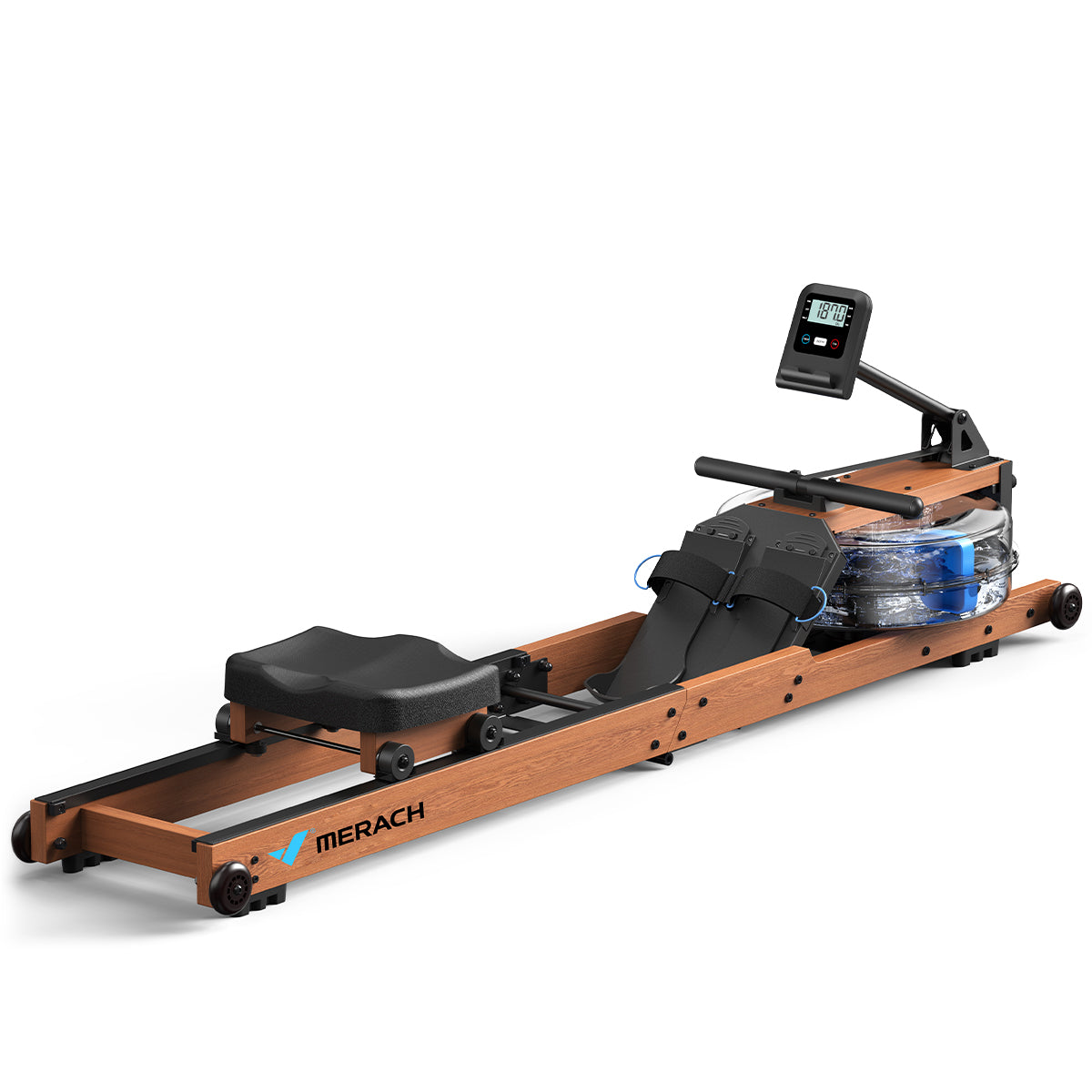
The Merach R28 is a water rowing machine with Bluetooth connectivity, and QZ now gives it a complete connected-training workflow. With the dedicated Merach/FitPlus rower support, the R28 can be used as a proper virtual rower with MyWhoosh and other compatible training applications.

Table of Contents
Merach R28 compatibility summary
| Equipment | Merach R28 water rowing machine |
| Bluetooth name | Devices beginning with MRK-R28- |
| QZ device path | Dedicated FitPlus/Merach rower implementation |
| Merach protocol | Proprietary Merach FFF0 communication path |
| Virtual device | Virtual Rower mode with correct rowing semantics |
| PM5-style workflow | Supported through QZ’s virtual rower mode |
| Training app | MyWhoosh rower workflow confirmed |
| Workout data | Rower data is read by QZ and made available through the selected virtual-device connection |
A dedicated rower path for the R28
QZ recognises the Merach R28 through its MRK-R28- Bluetooth name and routes it through the dedicated fitplusrower implementation. This combines QZ’s rower functionality with the communication method used by Merach equipment, preserving the proprietary FFF0 protocol described in QZ pull request #5054.
The result is a complete rowing data path inside QZ: the application connects to the R28, reads the workout data and can expose a virtual rower to the training application selected by the user.
Virtual Rower and PM5 mode
The R28 support includes QZ’s Virtual Rower workflow. When an app expects a Bluetooth rower, QZ can present the R28 through the virtual rowing-device path, making the rowing metrics available in the format used by compatible training platforms.
QZ also includes a PM5-style virtual rower mode for rowing applications and setups that use the Concept2 PM5 profile as their expected connection format. This makes the R28 a flexible source for modern indoor-rowing software while keeping QZ between the physical machine and the training app.
MyWhoosh with the Merach R28
The complete R28 → QZ → MyWhoosh workflow has been confirmed with real-device testing. QZ connects to the Merach rower, provides the rowing data and exposes the virtual rower that MyWhoosh can use for a connected workout.
- Wake the Merach R28 and enable Bluetooth on the device running QZ.
- Open QZ and allow it to detect the
MRK-R28-XXXXdevice. - Confirm that the R28 is connected through the Merach/FitPlus rower path.
- Enable the QZ Virtual Rower option.
- Enable the PM5-style rower option when the target setup expects that profile.
- Open MyWhoosh and pair the virtual rower exposed by QZ.
- Start a rowing workout and use the QZ rower tiles to follow the live data.
Merach R28 hardware features
The R28 combines a compact wooden frame with smooth water resistance and the connected features needed for app-based training. Its water tank uses two paddles and offers six water-resistance levels by adding or removing water. The water response naturally increases with the pace of the stroke, creating a fluid rowing feel.
| Resistance | Pure water resistance, six levels, adjustable by water volume |
| Water tank | Polycarbonate tank, 14 litres when full, leak-resistant construction |
| Paddles | Two-paddle design for a smooth full-body rowing stroke |
| Frame | Rubberwood and steel construction |
| Maximum user weight | 180 kg / 400 lb |
| Storage | 180-degree foldable rail with upright storage and transport wheels |
| Rail | Dual rail, 900 mm rail length and 1173 mm inner track length |
| User height | Approximately 120–200 cm / 3 ft 11 in–6 ft 7 in |
| Seat | Ergonomic PU-foam seat, 220 mm seat height |
| Foot pedals | Six-position length adjustment |
| Monitor | LED digital display |
| Connectivity | Bluetooth, with integrated tablet holder |
Workout data shown by the R28 monitor
The integrated LED monitor tracks the information most rowers want to see during a session:
- Time
- Time per 500 metres
- Distance
- Calories
- Strokes per minute
- Watts
- Current strokes
- Total strokes
- Pulse
What QZ adds to the R28
QZ acts as the bridge between the physical rowing machine and the training software. It can read the R28 over Bluetooth, display live workout tiles and provide the selected virtual rower connection to apps such as MyWhoosh, Zwift, ROUVY, Kinomap and other compatible platforms.
QZ also supports broader connected-training features, including external Bluetooth, ANT+ and Apple Watch heart-rate sources where supported, plus workout connections with Apple Health / HealthKit, Garmin Connect, Strava and Google Health / Health Connect. The available options depend on the platform and the selected QZ workflow.
For the Merach R28, the most important result is the dedicated rowing path: the R28 becomes a connected source for a real virtual-rower experience rather than being limited to the manufacturer’s app.
QZ setup in a few steps
- Install a QZ build containing Merach R28 support.
- Place the R28 close to the phone or tablet running QZ and wake the rower.
- Open QZ and select the detected
MRK-R28-XXXXdevice. - Use the dedicated FitPlus/Merach rower connection and confirm the live rower tiles.
- Turn on Virtual Device Rower in QZ.
- Select the PM5-style virtual rower option for apps that use the PM5 connection format.
- Open MyWhoosh and connect the QZ virtual rower for the workout.
The Merach R28 is a good example of what QZ does best: connect a capable piece of fitness hardware to the wider training-app ecosystem and give rowers the freedom to choose how they train.
For help with your setup, send an email to Roberto.viola83@gmail.com and Roberto will help you check the setup.
Want to use your rower with more training apps? Download QZ and learn more at qzfitness.com.