
Table of Contents
Sapphire Jetta SG-925B and QZ: Connected Indoor Cycling with FTMS Apps
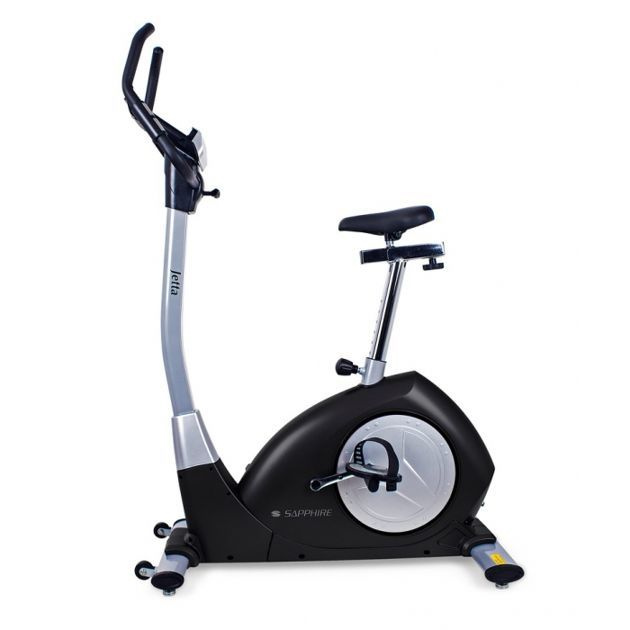
The Sapphire Jetta SG-925B is an electromagnetic-resistance exercise bike designed for smooth indoor training. With QZ, the Jetta can become part of a modern connected-cycling setup, bringing the bike into compatible FTMS workflows and making its training data available to the apps and services you already use.
The confirmed setup uses QZ’s iConsole options. Enable Toorx FTMS Bike under iConsole Settings and QZ can provide the connection bridge needed for compatible training applications, virtual rides and workout recording.
Connect the Sapphire Jetta SG-925B to QZ
Use this setup for the Jetta:
- Wake the bike and close any other fitness app connected to it.
- Open QZ and go to the bike settings.
- Open iConsole Settings.
- Enable Toorx FTMS Bike.
- Restart QZ so the FTMS connection is initialized cleanly.
- Select the bike in the compatible training application you want to use.
- Start pedaling and confirm that the live workout data is updating.
- Test the resistance workflow before beginning a longer session.
The exact app connection screen depends on the selected platform, but the important QZ setting is Toorx FTMS Bike under iConsole Settings. Once enabled, QZ acts as the bridge between the Jetta and the compatible FTMS training workflow.
What QZ adds to the Jetta
QZ gives the Sapphire Jetta SG-925B a more flexible software layer around its indoor-cycling hardware. Depending on the selected profile and application, the connected setup can provide:
- live cycling workout data;
- speed, cadence and power-related metrics where supplied by the bike or profile;
- compatible FTMS app connectivity;
- resistance workflows supported by the selected connection;
- workout recording and structured-training support;
- a bridge between the physical bike and modern virtual-training platforms.
The Jetta remains the physical exercise bike with its electromagnetic resistance system, while QZ makes the compatible data and control path easier to use across a wider training ecosystem.
Virtual rides and connected workouts
With QZ acting as the bridge, the Sapphire Jetta can fit into connected indoor-cycling sessions using compatible FTMS applications. Use a phone, tablet, computer or television for the virtual environment while keeping the Jetta in front of you for the physical ride.
The setup is suitable for endurance sessions, interval blocks, structured workouts and virtual routes where the selected app supports the connected-bike workflow. Start with a short test session, verify the live data and check resistance behavior before moving to a longer workout.
The wider QZ ecosystem
Beyond this device-specific connection, QZ can act as a flexible training and data bridge across a much wider fitness ecosystem. The exact options depend on the selected profile, platform and hardware, but the broader QZ toolkit includes:
- customizable tiles, multiple profiles and UI zoom controls;
- Peloton bike metrics, power zones, resistance conversion and supported auto-resistance workflows;
- Apple Watch, ANT+ and Bluetooth heart-rate support, custom heart-rate zones and wattage estimation from heart rate and cadence;
- Zwift, Wahoo RGT, VzFit, Rouvy, iFIT, Echelon, BitGym and Wahoo DirCon where supported;
- Kinomap, MyWhoosh and other compatible apps when the selected device workflow supports them;
- local or cloud video, GPX route following, 2D/3D maps, ZWO and XML workouts;
- heart-rate-following workouts, random workouts, standalone QZ workouts and structured/ERG sessions;
- end-of-workout email reports, Strava uploads, Garmin FIT/Garmin Connect workflows, Apple Health/HealthKit and Google Health/Google Health Connect integrations where supported;
- MQTT, OpenSoundControl/OSC, text-to-speech/TTS, Bluetooth remote resistance shifting, Zwift Play & Click and ANT+ retransmission.
These are QZ ecosystem capabilities rather than a promise that every function is native to the Sapphire Jetta SG-925B. The device-specific Toorx FTMS Bike setting under iConsole Settings remains the authoritative setup for this bike. Third-party apps may also have their own account, subscription and content requirements.
A more flexible Sapphire Jetta
The Sapphire Jetta SG-925B provides a stable electromagnetic-resistance platform for home cycling. QZ adds the freedom to connect that hardware to compatible FTMS apps, structured training workflows, health integrations and workout recording.
Enable Toorx FTMS Bike under iConsole Settings, restart QZ and connect the bike through the compatible application. Once live data and the resistance workflow respond correctly, the Jetta is ready for a more flexible connected-training experience.
If something does not work as expected, send an email to Roberto.viola83@gmail.com and Roberto will help you check the setup.
Learn more about QZ at qzfitness.com.