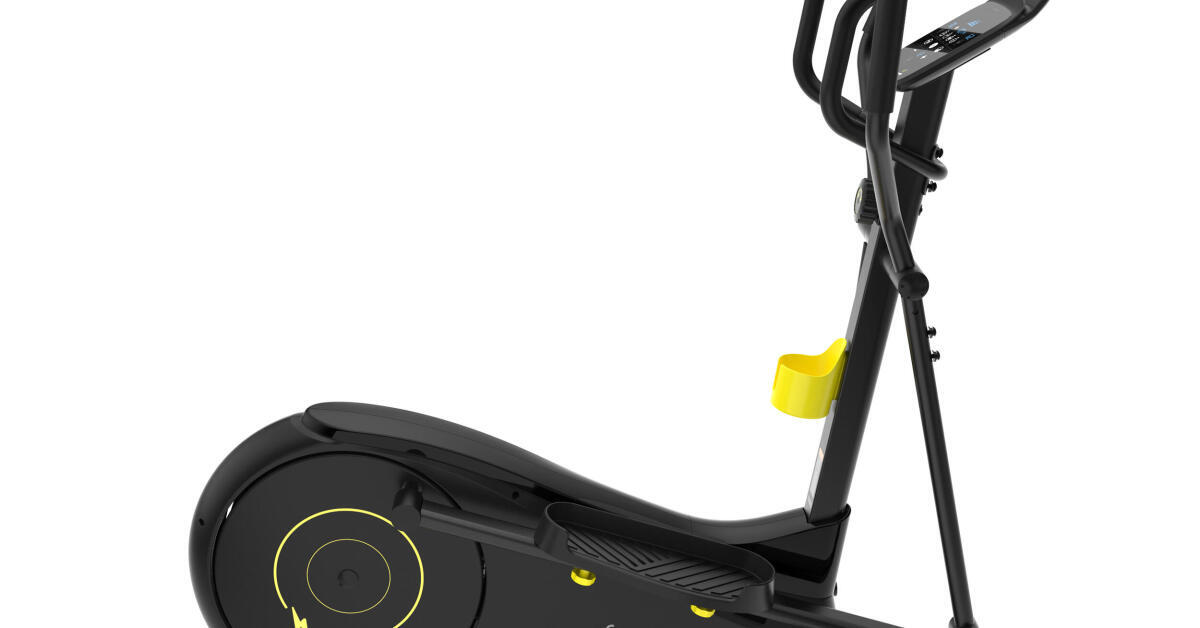
QZ includes a dedicated Domyos elliptical compatibility path that covers the FEL520, also identified by Decathlon as the EL520. The setup brings the elliptical’s live workout data into QZ and exposes it to compatible virtual-training workflows.


Table of Contents
What the Domyos FEL520 / EL520 is
Decathlon’s official FEL520 support page identifies the product as the Elliptique 520, reference 8503081, also sold as the EL520 in English-language product material. It is a self-powered elliptical with a 9 kg flywheel, six console functions, built-in training programs and E-Connected coaching support. The console reports workout values including speed, distance, calories, cadence and heart rate through its exercise interface.
How QZ detects the elliptical
The QZ Bluetooth discovery path recognizes Domyos elliptical devices whose advertised name begins with Domyos-EL. QZ uses the Domyos elliptical driver and its proprietary BLE service/characteristic path when the device exposes that service. If a compatible Domyos elliptical instead exposes FTMS, QZ has a separate FTMS fallback setting for that route.
What QZ can read and calculate
| Capability | QZ behaviour |
|---|---|
| Speed | Reads the speed field from the Domyos notification packet and applies the configured Domyos elliptical speed ratio. |
| Cadence | Reads the cadence field and applies QZ’s cadence gain/offset settings when configured. |
| Resistance | Reads the current resistance level from the device packet and normalizes invalid low values to the driver’s safe baseline. |
| Calories and heart rate | Reads calories and, unless disabled or replaced by an external source, the console heart-rate field. Bluetooth, ANT+ and Apple Watch heart-rate sources can be used through QZ’s general heart-rate workflows. |
| Distance | QZ maintains session distance from the live speed stream. This is a QZ-calculated workout value, separate from the manufacturer’s console display. |
| Power | QZ calculates a watt estimate from the live speed/cadence/resistance path and the configured user/device settings; this should be treated as an estimate rather than a power-meter measurement. |
Resistance control and workout lifecycle
The Domyos driver serializes resistance commands for the proprietary console protocol and bounds requests to the supported QZ control range. It also provides the initialization sequence used to start the workout path and the stop command used when QZ stops the session. Recent merged QZ changes improve the initialization retry/acknowledgement path and avoid an unwanted stop during workout autostart.
The FEL520 is not presented here as an incline-controlled machine. The QZ driver contains a generic inclination path for Domyos elliptical profiles, but the official FEL520 material does not establish physical incline hardware; resistance is the relevant device-specific control for this model.
Setup
- Install a QZ build containing the merged Domyos EL520 initialization fixes, or a later release that includes them.
- Turn on the elliptical and close E-Connected, Kinomap or any other app that may hold the Bluetooth connection.
- Start QZ and allow it to discover the
Domyos-ELdevice automatically. - Confirm speed, cadence, resistance, calories, heart rate and the QZ session distance before pairing a target app.
- If resistance control is needed, test a small target first and confirm that the physical console changes level.
- Pair Zwift or another compatible app with QZ’s virtual output rather than connecting the app directly to the physical elliptical.
The wider QZ feature set
QZ can be much more than a Bluetooth relay around a supported elliptical. The exact result depends on the selected driver, operating system, permissions and target app. The following are QZ capabilities around a compatible training workflow; they are not claims that the FEL520 console natively provides every integration.
| Area | What QZ can offer |
|---|---|
| Profiles and interface | Multiple user/device profiles, custom tile order and visibility, UI zoom, live tiles, charts, workout history and session recording. |
| Elliptical metrics | Live speed, cadence, power, resistance, calories, session distance calculated from the live stream and heart-rate data when the console packet or a paired source supplies it. |
| Heart rate | Bluetooth heart-rate devices, ANT+ heart rate and Apple Watch sources, with configurable zones and heart-rate-guided workout workflows. |
| Virtual training bridge | Virtual-bike/FTMS-style bridging for Zwift, MyWhoosh, Rouvy, Wahoo RGT, Kinomap, BKOOL, Fulgaz, VzFit, BitGym, Echelon and other compatible applications where the selected virtual profile is supported. |
| Resistance and workout control | Resistance targets, automatic-resistance or ERG-style workflows when the target app and the concrete QZ driver expose compatible commands. A virtual connection alone does not guarantee every app can control the physical resistance. |
| Standalone QZ | Live monitoring, recording, charts, target workouts, random sessions, heart-rate-following programs and virtual training workflows without another training app. |
| Workout formats | Video workouts, GPX routes with 2D/3D maps, ZWO Zwift workouts, XML files, structured intervals and random workouts where the selected path supports the required targets. |
| Health and exports | Apple Health/HealthKit, Google Health Connect, Garmin FIT and ANT+ workflows, Strava upload, email workout reports and compatible activity exports. |
| Advanced integrations | MQTT, OSC, text-to-speech, Wahoo DirCon, ANT+ retransmission, Bluetooth remote control and Zwift Play & Click integrations where the platform and setup support them. |
Zwift, MyWhoosh and other apps
With QZ acting as the bridge, the FEL520 workout can be made available to compatible virtual-training applications through QZ’s virtual-device output. Depending on the selected platform and profile, this can include Zwift, MyWhoosh, Rouvy, Wahoo RGT, Kinomap, BKOOL, Fulgaz, VzFit, BitGym and other supported workflows. The physical elliptical remains connected to QZ while the target app connects to QZ’s virtual device.
QZ can also run the session by itself: show live tiles and charts, record the workout, run structured or random intervals, follow a GPX route or video, use ZWO/XML workouts and follow heart-rate targets. The resulting activity can then be exported through the available health and training integrations.
Evidence boundary
The public QZ source and merged pull requests establish the Domyos-EL discovery path, proprietary service handling, telemetry decoding, resistance serializer, initialization retry logic and workout-autostart handling. This article is therefore a code-supported compatibility/setup guide. It does not claim that every FEL520 firmware revision or every third-party app has been independently tested on physical hardware; verify the first connection and resistance command on the individual machine.
Troubleshooting
- Check that the Bluetooth name begins with
Domyos-ELand that no other app is connected. - Restart QZ after changing Bluetooth permissions or the Domyos elliptical/FTMS selection.
- Verify live metrics in QZ before pairing Zwift or another target app.
- If the console uses FTMS rather than the proprietary service, enable the Domyos elliptical FTMS path and restart QZ.
- If resistance is not applied, test one small level and compare the physical console with the QZ tile.
If something does not work as expected, send an email to Roberto.viola83@gmail.com with the QZ version, the displayed Bluetooth name and a sanitized log.
Sources
- fel520
- rowing-machine-compatible-with-the-domyos-e-connected-app-el-520
- 8503081.jpg?format=auto
- 5303
- 5294
- 69faed80264ba674780bac3fbe541827684867ce
- ec6d2e9f748258327d3d0d0ba17327ff11437702
- domyoselliptical.cpp
- bluetooth.cpp
- README.md
- 20_supported_devices_and_applications.md
- integrations.md
- WorkoutTracking.swift
- HealthConnectHelper.kt
- mqtt.cpp
- osc.cpp