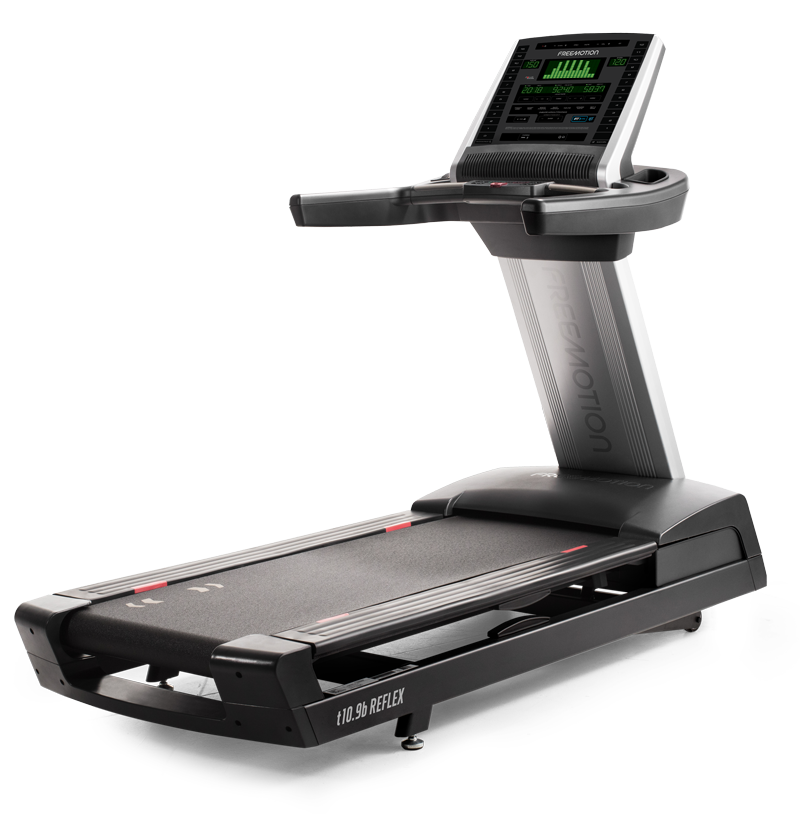
QZ now includes a dedicated Freemotion t10.9b REFLEX™ treadmill profile based on PR #5281. The merged profile follows the captured iFIT-family HCI sequence, reads the treadmill telemetry, and adds QZ speed, incline and workout-control handling for this model.

Table of Contents
What was added in PR #5281?
PR #5281 adds the Freemotion T10.9B (HCI snoop) model option to QZ’s treadmill settings and routes it through the existing ProForm/iFIT-family treadmill implementation. The code is in public master through merge commit 8b2e98c.
The Freemotion t10.9b Reflex is an iFIT-connected treadmill with speed and incline-matching capability. Its official product information lists speed, time, incline, distance, pace, calories and heart rate among the console readouts. QZ’s profile is therefore a bridge for the treadmill session: it connects the captured HCI protocol to QZ’s metrics, virtual treadmill and workout ecosystem.
Freemotion-specific QZ compatibility
| Capability | What the merged profile does |
|---|---|
| Dedicated model selection | Select Freemotion T10.9B (HCI snoop) in QZ’s treadmill model options. The setting is restart-required and is kept separate from the neighbouring ProForm profiles. |
| Captured initialization | Replays the captured I_TL initialization sequence, including the HCI exchange and the recurring setup frames used before the live poll cycle. |
| Live speed | Decodes the profile’s hundredths-formatted speed field and updates QZ treadmill speed in km/h. |
| Live incline | Decodes the signed hundredths-formatted incline field and updates QZ treadmill incline. |
| Distance, calories and cadence | QZ continues its treadmill metric pipeline: distance is accumulated from live speed, calories are calculated from the QZ workout inputs, and cadence can be calculated from speed when no separate power sensor is selected. |
| Speed control | The profile adds the native Freemotion speed selector, little-endian hundredths value and checksum base used by the captured command format. |
| Incline control | The profile adds the native Freemotion incline selector, little-endian hundredths value and checksum base used by the captured command format. |
| Start, stop and pause | QZ sends the captured Freemotion start and stop command sequences, with the pause request using the stop path already exposed by the treadmill control model. |
How to set it up
- Install a QZ build that contains PR #5281 or a later release containing merge commit
8b2e98c. - Open QZ’s treadmill model settings and select Freemotion T10.9B (HCI snoop).
- Restart QZ when prompted so the new profile is loaded.
- Turn on the t10.9b and keep other treadmill Bluetooth apps disconnected while QZ establishes the connection.
- Confirm that QZ receives speed and incline values from the treadmill.
- Enable the QZ virtual treadmill output and pair Zwift or another compatible training app with QZ’s virtual treadmill.
- Use the QZ controls or the compatible app’s workout targets for speed and incline when that app sends supported treadmill commands.
The main QZ feature set
QZ adds a flexible bridge and workout layer around the equipment connection. These features are app-, platform- and driver-dependent; they are listed separately from the Freemotion profile so the article does not confuse a general QZ capability with a native treadmill feature.
| Area | What QZ can offer | Freemotion t10.9b context |
|---|---|---|
| Live metrics and UI | Custom tiles, tile visibility and order, user/device profiles, zoom, charts, live values and workout recording. | QZ can display the telemetry received through the t10.9b profile and expose it to the selected virtual device. |
| Heart rate | Bluetooth, ANT+ and Apple Watch heart-rate sources, with configurable heart-rate zones and heart-rate tools. | Use the treadmill EKG grips or a separately paired QZ heart-rate source according to the available connection path. |
| Virtual treadmill bridge | Virtual treadmill/FTMS output for Zwift, MyWhoosh, Rouvy, Wahoo RGT, Kinomap, BKOOL, Fulgaz, VzFit, BitGym and other compatible applications. | The Freemotion profile supplies the treadmill telemetry and can receive supported app control through QZ’s treadmill path. |
| Speed and incline workflows | QZ supports treadmill speed/incline workflows and app-driven control where the selected driver and target app provide the required commands. | PR #5281 adds the t10.9b-specific speed and incline serializers, including the captured HCI selectors and checksums. |
| Peloton and training modes | Peloton-oriented metric, heart-rate and auto-workout workflows, plus standalone QZ workouts where the selected device path supports the required controls. | These are QZ workflows around the treadmill session, not a claim that the Freemotion console is a Peloton device. |
| Workout formats | Video workouts, GPX routes with 2D/3D maps, ZWO, XML, random workouts and heart-rate-following programs. | Control-driven programs require the target app and the selected QZ path to provide compatible speed/incline targets. |
| Health and exports | Email reports, Strava, Apple Health/HealthKit, Google Health Connect and Garmin FIT activity workflows. | These integrations export or record the QZ session; they are not Freemotion/iFIT account features. |
| Advanced integrations | MQTT, OSC, text-to-speech, ANT+ retransmission, Bluetooth remote, Zwift Play & Click and Wahoo DirCon. | Enable only the integrations that match the phone, computer, watch or home-automation setup. |
Zwift and other training apps
With QZ acting as the bridge, the Freemotion session can be presented as a virtual treadmill to Zwift and other compatible applications. QZ’s documented app ecosystem includes Zwift, MyWhoosh, Rouvy, Wahoo RGT, Kinomap, BKOOL, Fulgaz, VzFit, BitGym and additional FTMS-compatible apps. The exact controls visible in each app depend on that app’s treadmill pairing and workout protocol.
QZ can also run standalone: use its tiles and charts, start a workout, follow a video or GPX route, run ZWO/XML or random workouts, follow heart-rate targets, and save or export the resulting session through the available integrations.
A build-based compatibility guide
The PR documentation records HCI-capture, parser and source-build evidence for the profile, while physical treadmill validation remains a separate step. Use a QZ build that actually contains the merged implementation and treat the first connection as a protocol/setup workflow. This keeps the article precise while still giving Freemotion owners a concrete path to try the new compatibility.
Subscription boundary
QZ is a separate bridge and workout layer. Any iFIT, Zwift, Rouvy, Garmin, Strava or other third-party membership, paid class or premium-content requirement remains controlled by that provider; QZ does not remove another service’s billing requirements.
Troubleshooting checklist
- Confirm that the selected model is Freemotion T10.9B (HCI snoop) and restart QZ after changing it.
- Close other Bluetooth treadmill apps before connecting QZ.
- Check Android/iOS Bluetooth permissions and ensure the treadmill is powered on.
- Verify speed and incline in QZ before pairing the external training app.
- Pair the external app with QZ’s virtual treadmill rather than making it compete for the physical treadmill connection.
- If a workout target does not change the treadmill, check that the target app sends treadmill speed/incline commands and that the QZ profile is active.
If something does not work as expected, send an email to Roberto.viola83@gmail.com and Roberto will help you check the setup.
Sources
- 5281
- 8b2e98ccc21cf28d3b946192094f4fb8af40d943
- https://www.freemotionfitness.com/cardio-machine/t10-9b-reflex-treadmill/
- t109b-treadmill
- t10.9b-Reflex_3Q.png
- proformtreadmill.cpp
- settings.qml
- README.md
- 20_supported_devices_and_applications.md
- integrations.md
- WorkoutTracking.swift
- HealthConnectHelper.kt
- mqtt.cpp
- osc.cpp